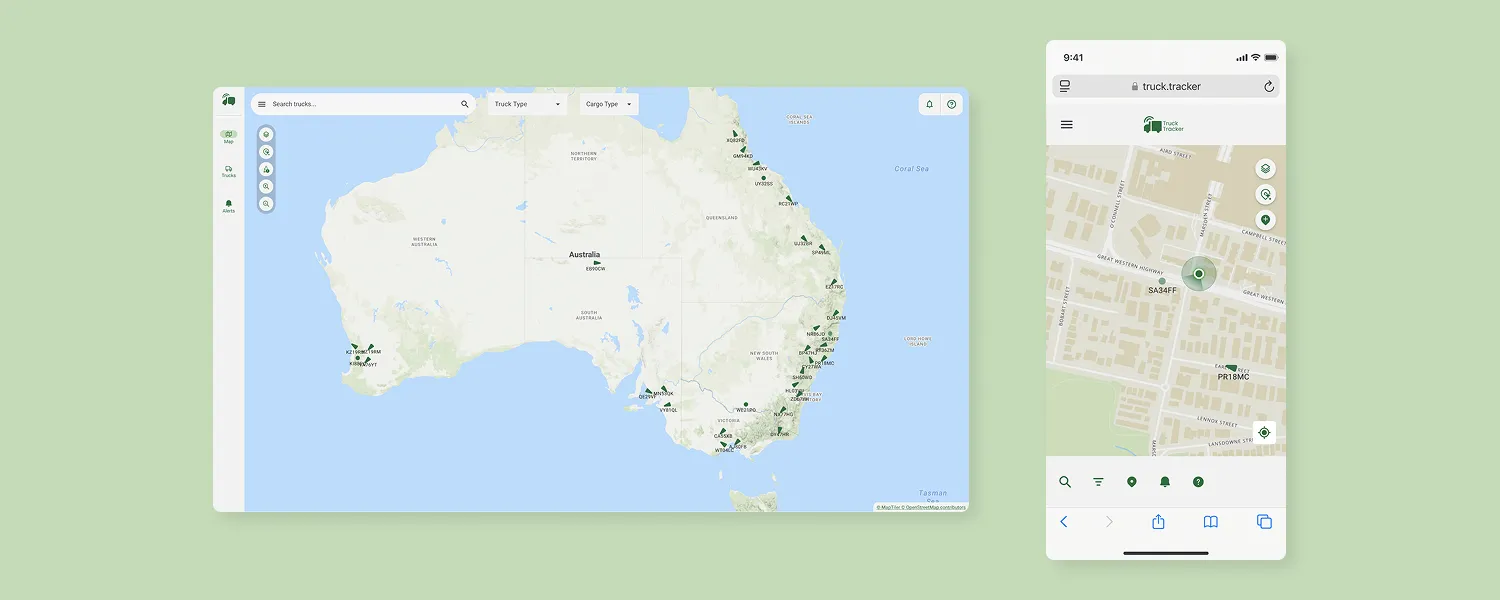
Transforming a desktop-only logistics platform for mobile users
We acknowledge the Aboriginal people as the Traditional Owners of this land, and pay our respects to Elders past and present. Working from Darug and Gadigal land.
A cost-conscious redesign that put a previously desktop-only asset mapping tool in the hands of frontline logistics workers, without compromising technical feasibility.
This case study has been rebranded and re-contextualised to remove identifiable client information to comply with NDA.
Contents
- My Role
- Project Overview
- Impact
- The Problem
- Goals and Objectives
- The Solution
- UX Research
- Stakeholder Engagement
- Solution
- Outcome and Final Remarks
My Role
I was contracted as a User Interface and User Experience Consultant and took ownership of the design process for mobile conversion from research to delivery.
Project Overview
Truck Tracker is an internal logistics platform originally designed for desktop use. This project explores options for adapting the platform for mobile users—particularly Truck Drivers and Depot Supervisors who spend much of their day away from a desk.
The mobile conversion project involved adapting desktop components of an existing application for a browser-based web app. The reason behind designing for a browser-based app is to reduce the workload required for the development team on a tight budget.
Impact
- Improved the Truck Tracker User Experience for mobile users, accounting for over 55% of the total user-base.
- Reduced time spent on context-switching between asset tracking systems, improving efficiency by up to 40%.
The Problem
While Truck Tracker works well for office-based users, it lacked mobile support—making it difficult for frontline workers to interact with the platform on the go.
Company X’s legacy system, which includes limited mobile functionality, was still heavily relied upon by mobile users. With the goal of deprecating that system, the company needed to:
- Justify mobile redesign with user research.
- Focus efforts on high-impact areas.
- Deliver results within tight technical and budget constraints.
Goals and Objectives
- Analyse the existing users of Truck Tracker to understand which area has the highest potential for growth.
- Investigate usage of the existing legacy mobile system.
- Conduct interviews with frontline workers to understand mobile use-cases.
- Consult and collaborate with Software Engineers to reach a compromise on functionality and technical feasibility.
- Create hi-fi prototypes aligned to the existing design system and branding.
The Solution
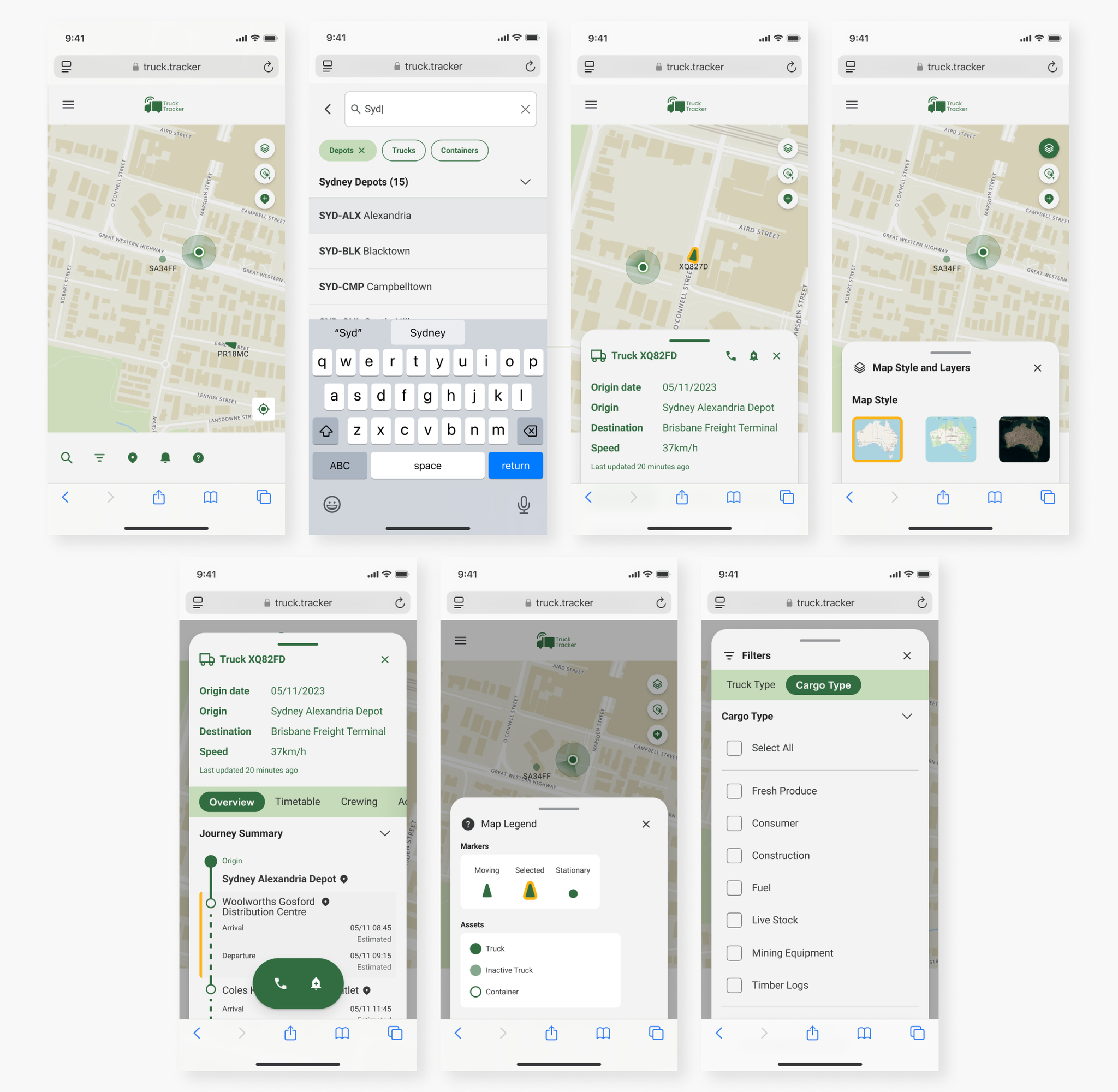
After examining usage analytics and conducting user interviews, I targeted the mobile UI conversion to focus on flows that are used by Truck Drivers (the most mobile user group of Truck Tracker).
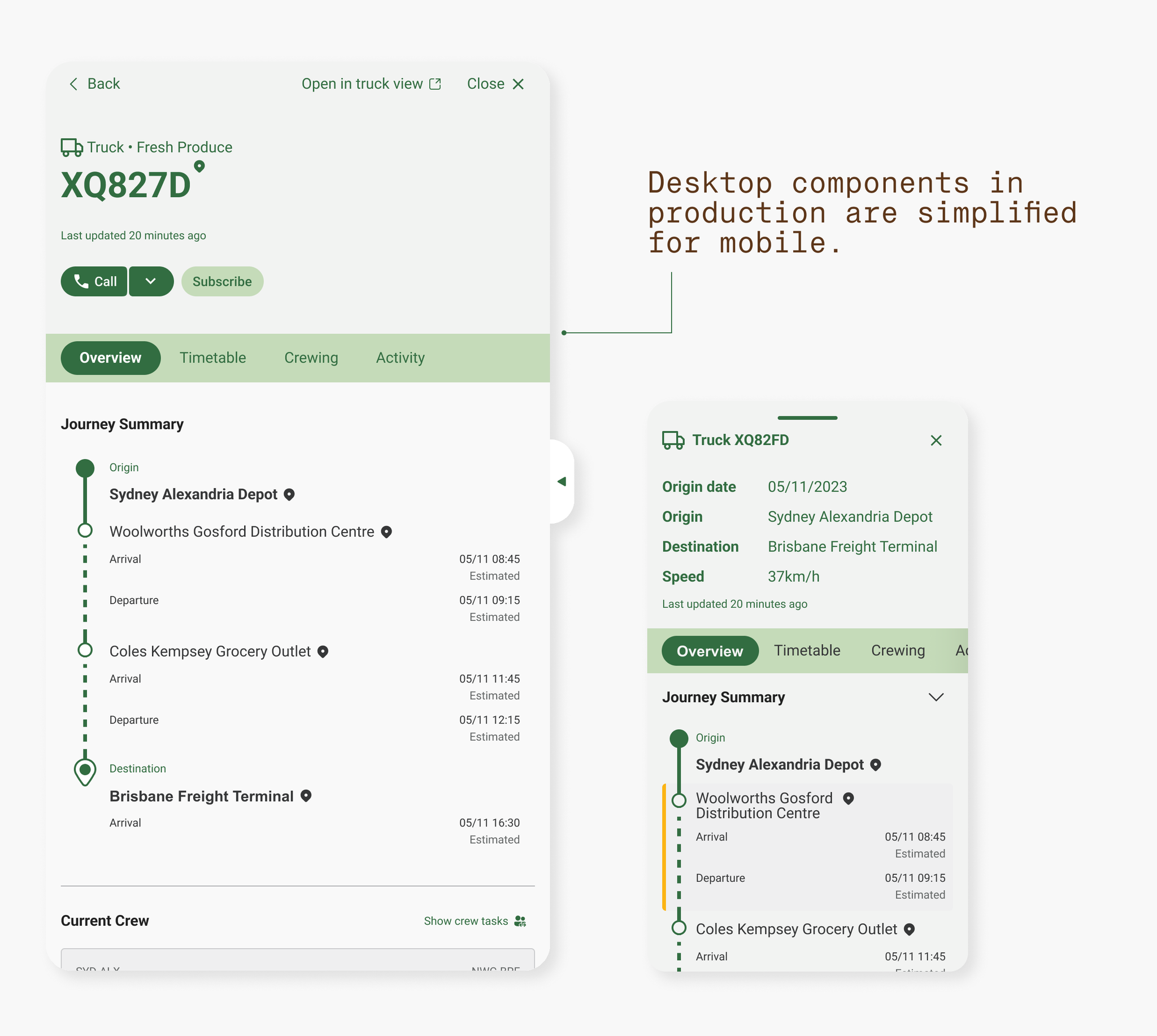
The mobile solution is browser-based and re-adapts desktop components to reduce the development time required and to maintain design consistency.
Changes were made to ensure that the interface is usable and intuitive with touch input.
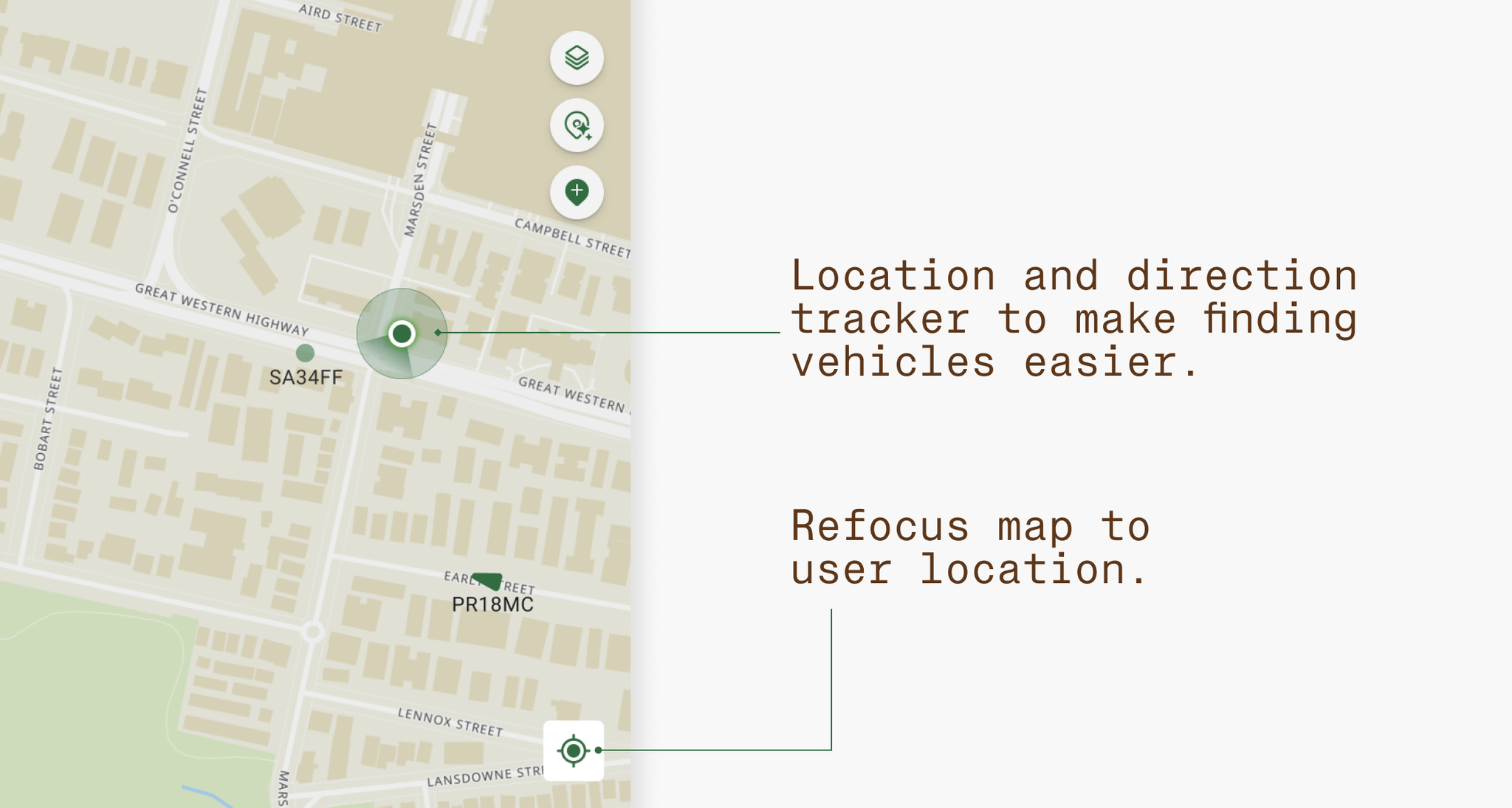
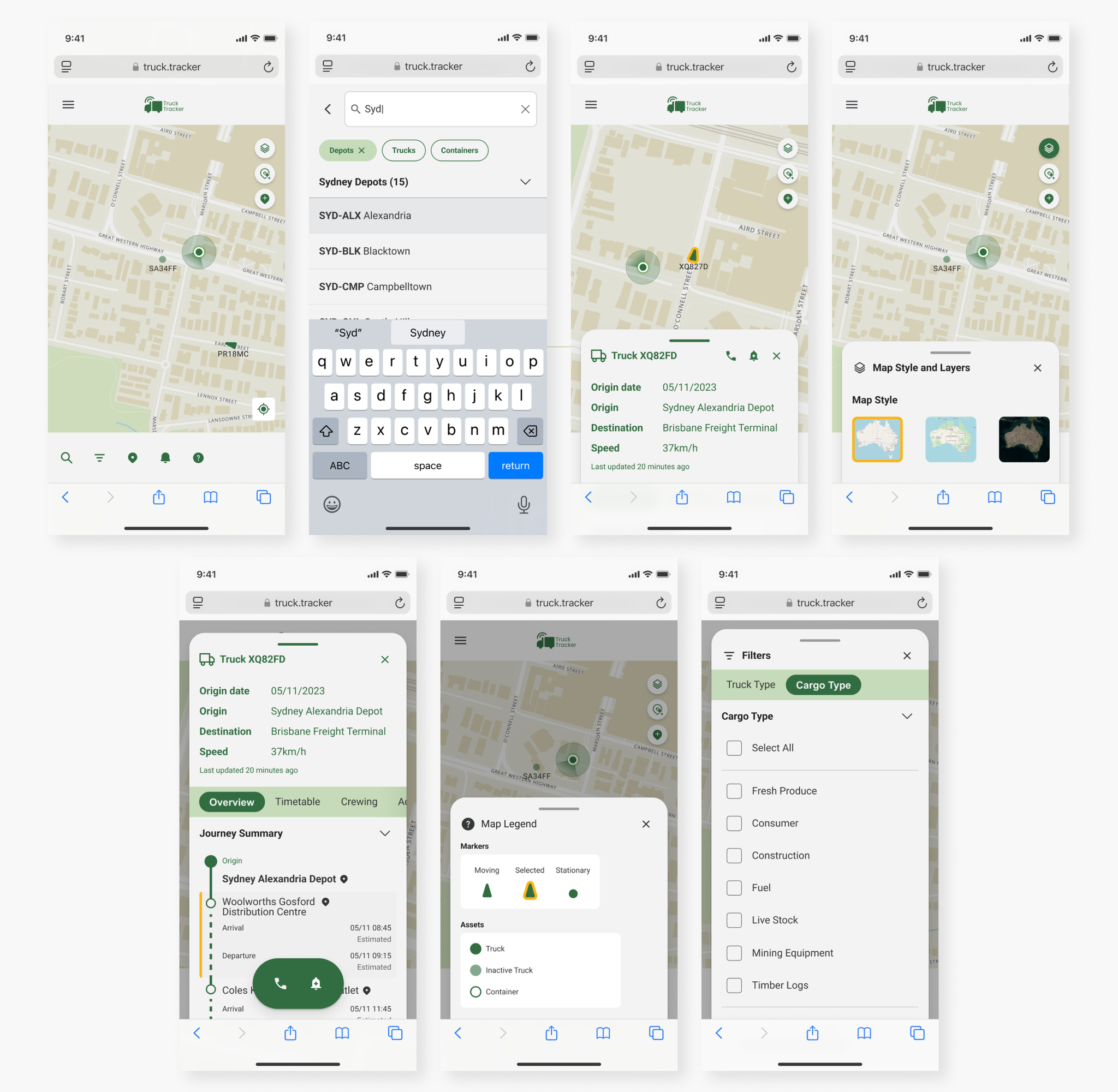
Users can view their own location on the map in mobile view
The original Truck Tracker application was designed for office-bound workers. Since the main user group of the mobile application is frontline workers such as Depot Managers and Truck Drivers, being able to determine user location is crucial for activities such as finding and managing vehicles.
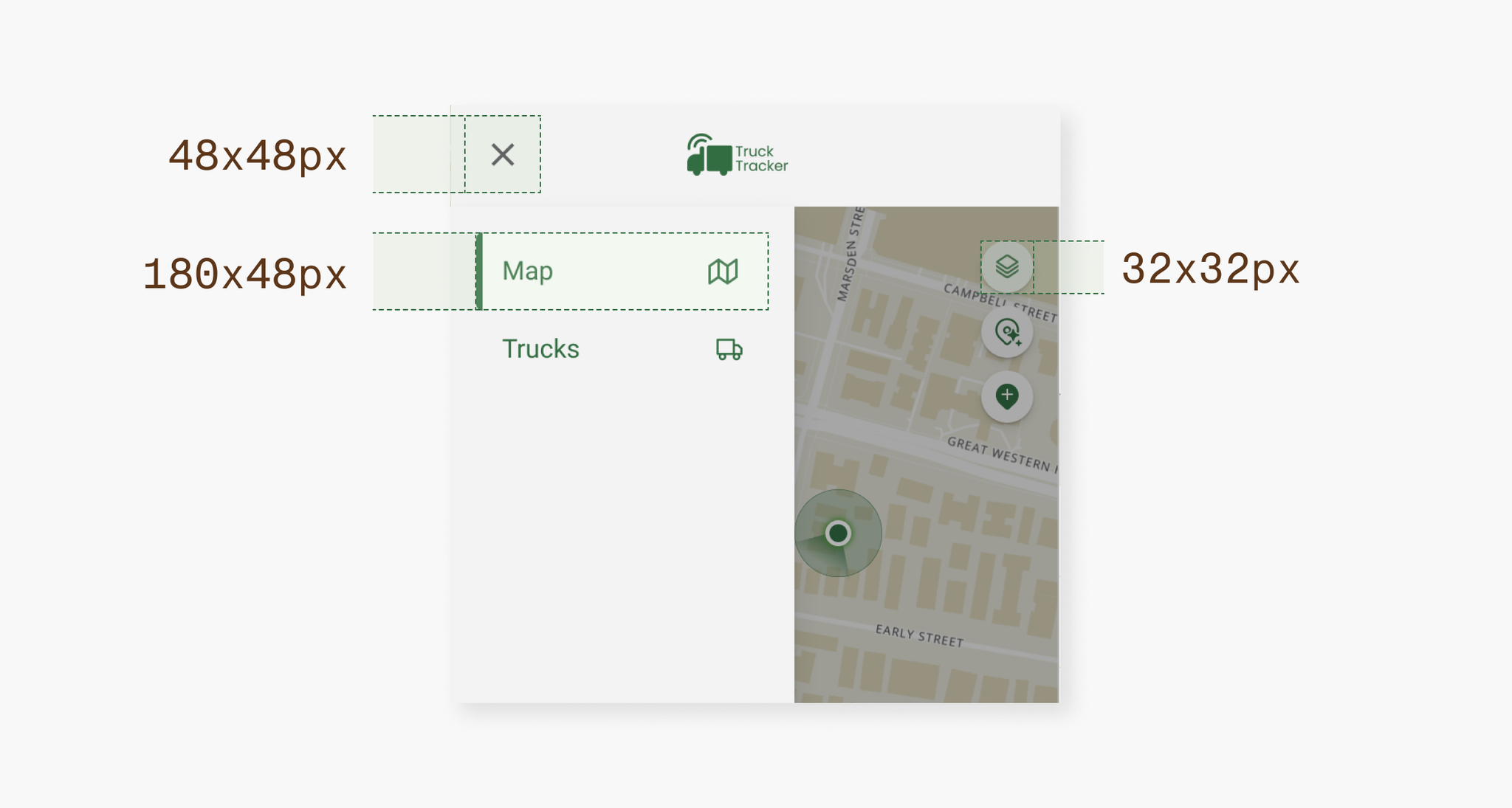
Touch-optimised interfaces that are “fat-finger” friendly
Key interactive UI elements are optimised with large touch targets and adequate spacing to prevent accidental taps. The WCAG 2.2 Level AA guidelines specify a minimum target size of 24x24px. Truck Tracker Mobile has a minimum touch target size of 32x32px for a balance of accessible and aesthetically pleasing UI.
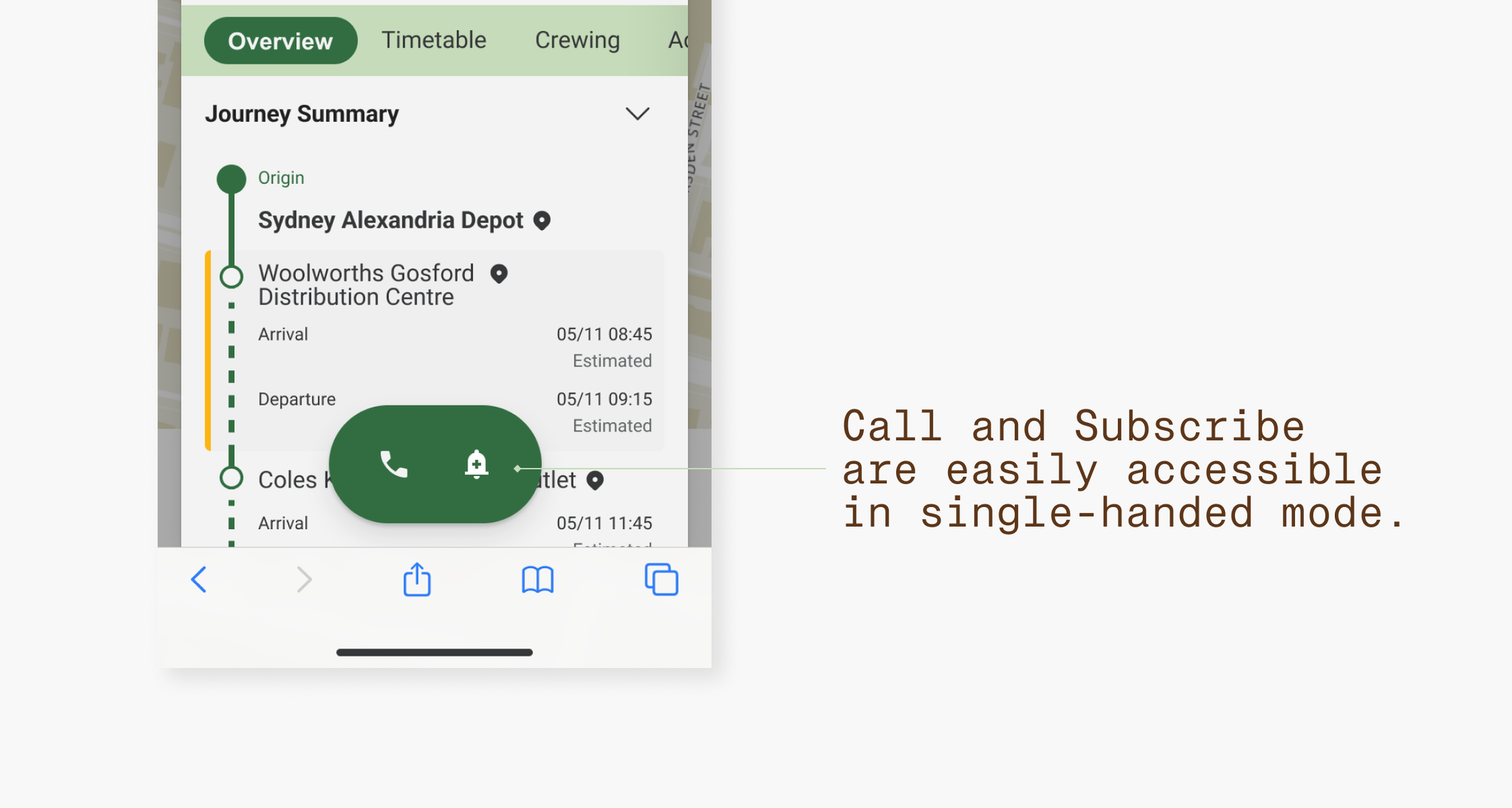
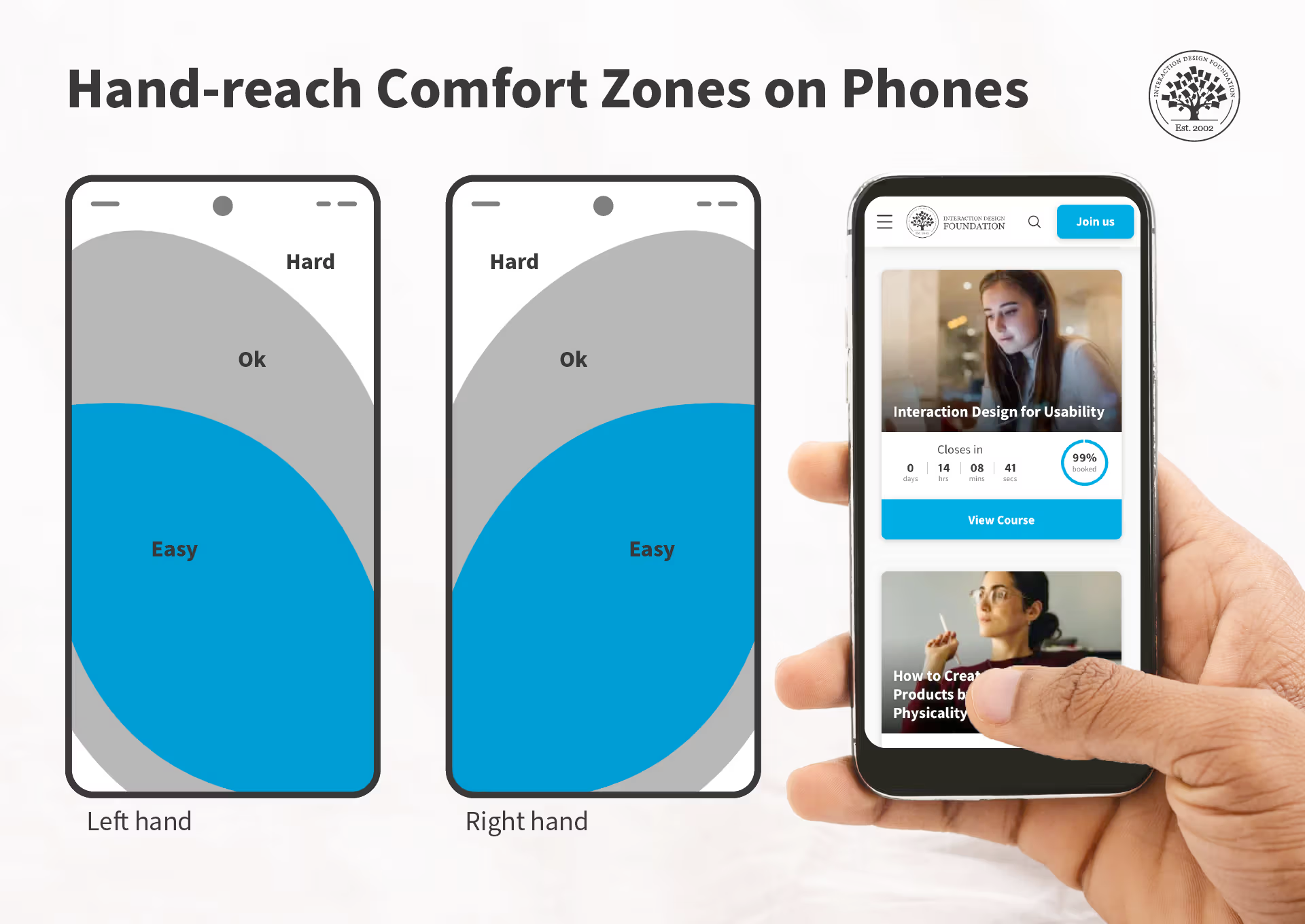
Essential actions reachable by single-handed use
The most important features of the application are designed to be within mobile hand-reach comfort zones. This ensures ease of use for a frontline user who is on the go.
Browser-based application to reduce development time from web-app to mobile native conversion
In a discussion with the Product Owner and Developers, the desktop-to-mobile conversion was a secondary priority in Truck Tracker’s project scope. From a technical feasibility and costing standpoint, the mobile designs are intended as a browser app, reflecting its React desktop counterpart.
UX Research
Microsoft Analytics Demographic Research
The most important part of user research in the design process is to validate whether the initiative itself would provide a return on investment. For the design team, a clear return on investment involve: increased users migrating away from the legacy system (which would free up internal resources required to maintain the system), and improved decision-making with reduced time needed to complete the same tasks.
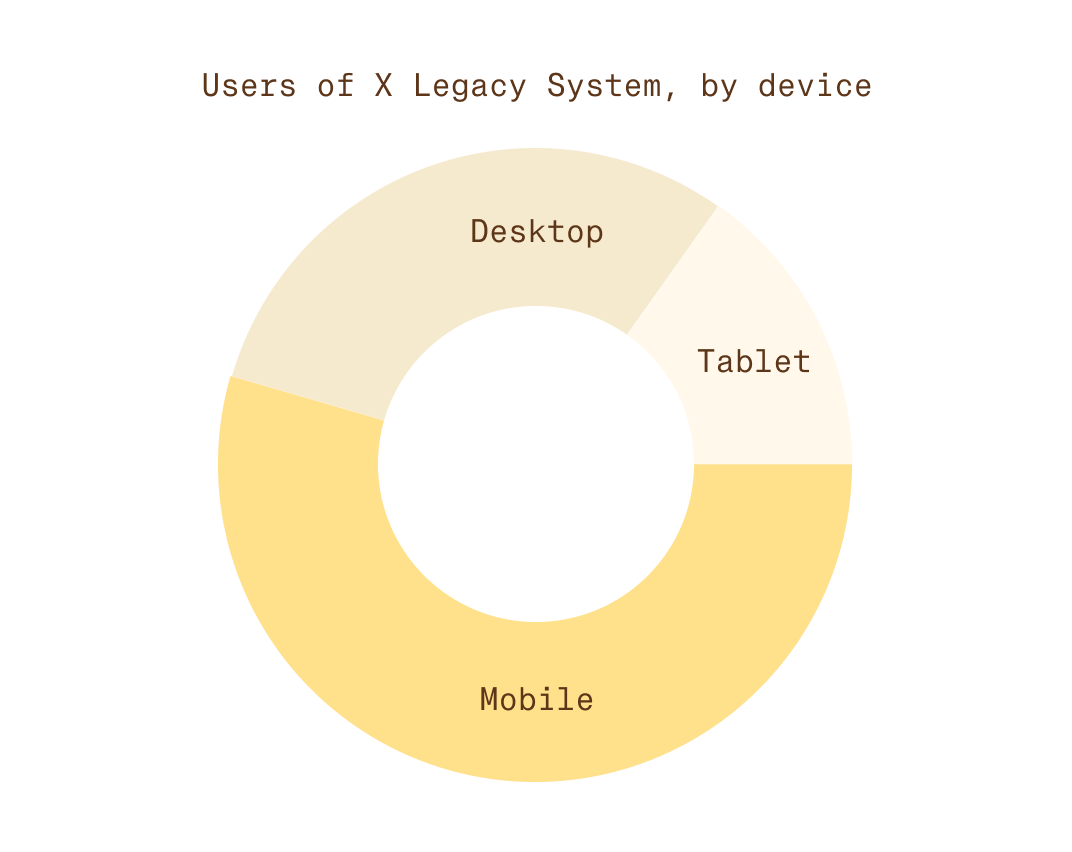
To begin this process, I examined the existing user base of X Legacy System and Truck Tracker through Google Analytics.
| User group | Time spent on Truck Tracker (h) |
|---|---|
| Operational Support (Office) | 5000 |
| Depot Supervisors (Frontline/Office) | 2400 |
| Scheduling Specialist (Office) | 1540 |
| Heavyweight Truck Supervisors | |
| (Frontline/Office) | 1470 |
| Truck Drivers (Frontline) | 1400 |
Data showed that Truck Drivers—despite not being office-bound—ranked fifth in terms of overall time spent on the desktop-only Truck Tracker platform.
Meanwhile, mobile usage of the legacy system significantly exceeded desktop or tablet use, validating the demand for mobile access.
The key takeaway is that Truck Drivers already use the system heavily despite its desktop-only design—showing clear opportunity and user value in a mobile adaptation.
User Interviews
So we now know who are using the fleet management platforms, and on what devices...
But why are they using it?
To gain deeper insight into user needs, I conducted video interviews with Depot Supervisors, who work closely with truck drivers and understand their pain points.
Note: Depot Supervisors work directly with, and/or manage Truck Drivers. Due to organisational constraints, I was unable to schedule interviews with the Truck Drivers themselves.
The video interviews were structured as mini-workshops through Miro and took around 30 minutes each.
The workshop involved three sections:
- Daily workflow and pain-points
- Feature usability in Truck Tracker and the legacy system
- Card sorting to rank current and future features
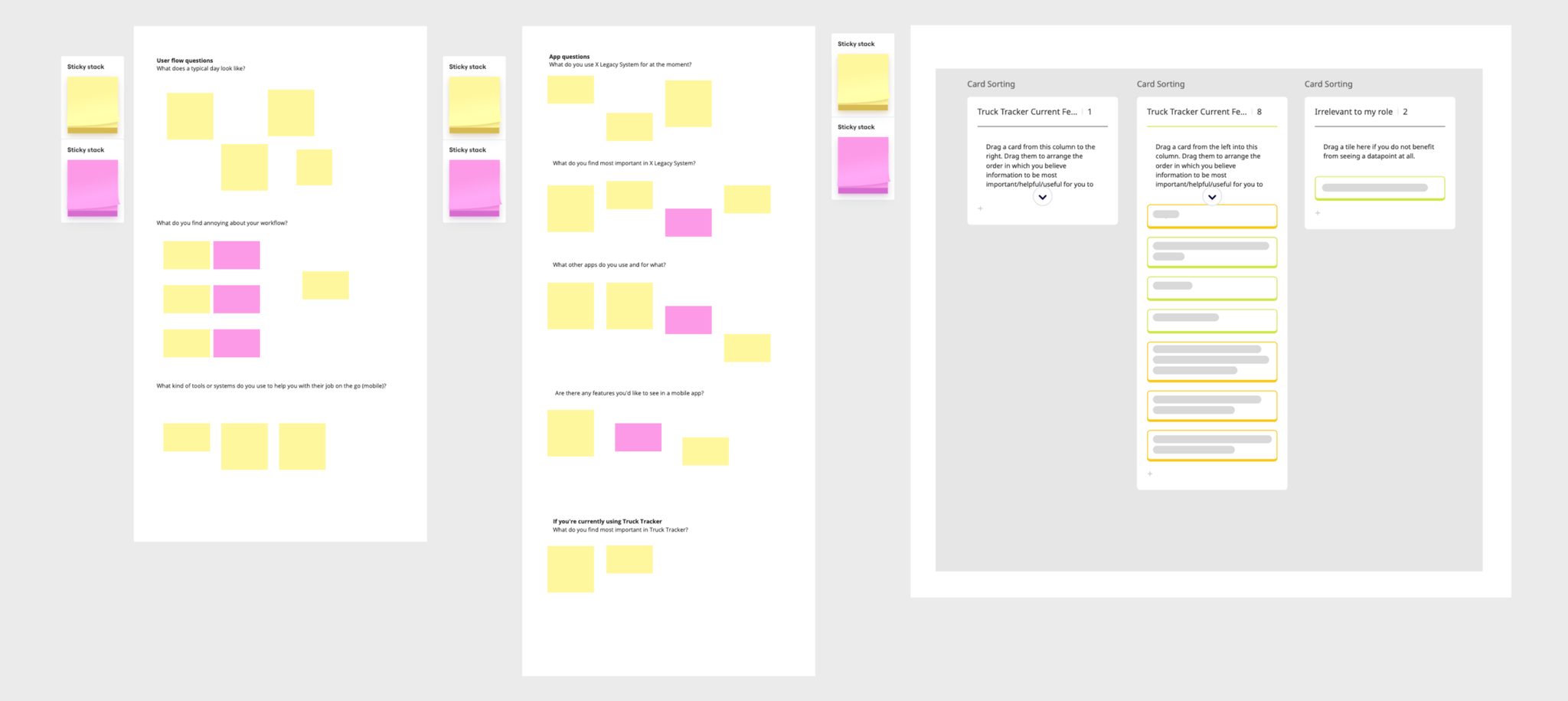
While the supervisors interviewed mostly work from their desktop computers, they gave some valuable input as to how Truck Drivers might utilise Truck Tracker on their phones. They also provided some feedback on pain-points with X Legacy System and other systems used to track their vehicles:
“It is annoying that we have to switch between [three different platforms] to see every truck. It’s good that Truck Tracker consolidates vehicles from the different providers and allows us to see them at a glance.”
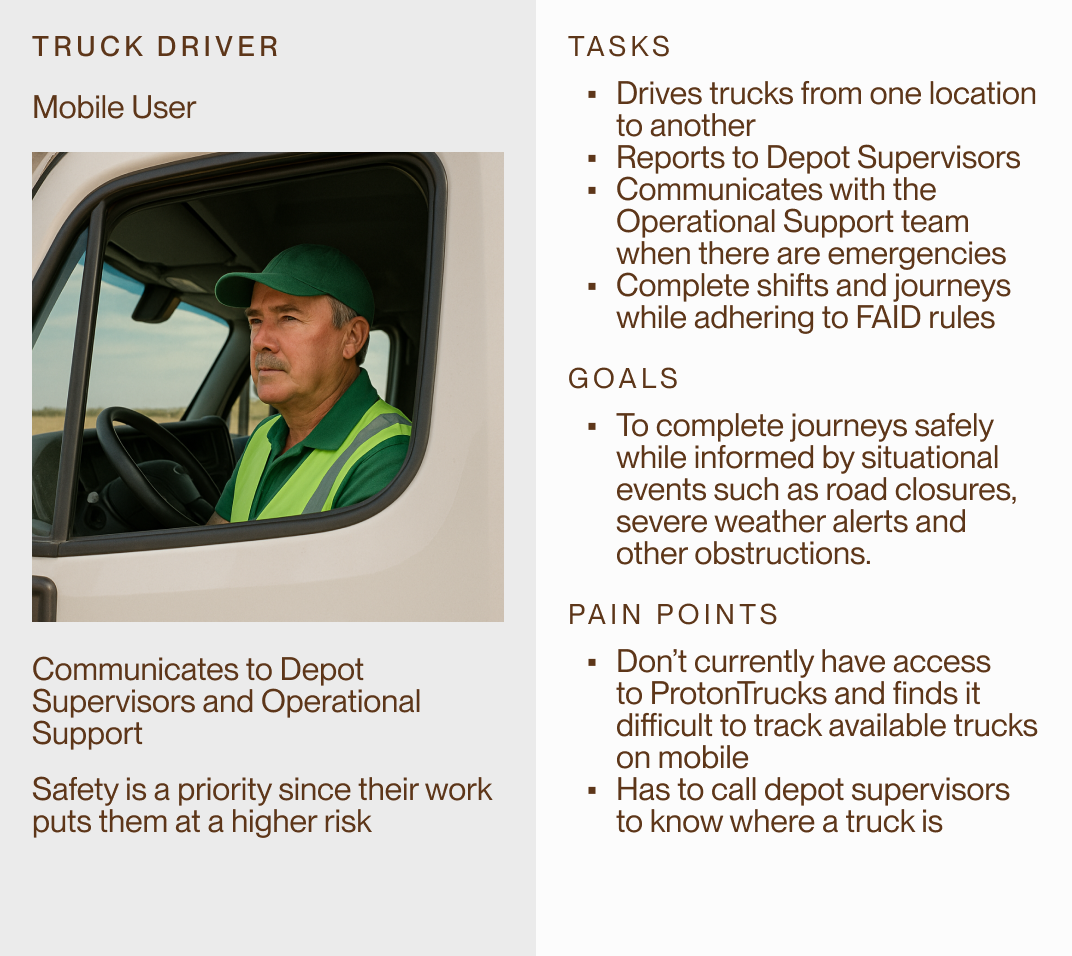
“Truck Drivers don’t currently have access to live tracking, so Truck Tracker would be useful for them to find the truck they want to drive.”
Key Takeaways
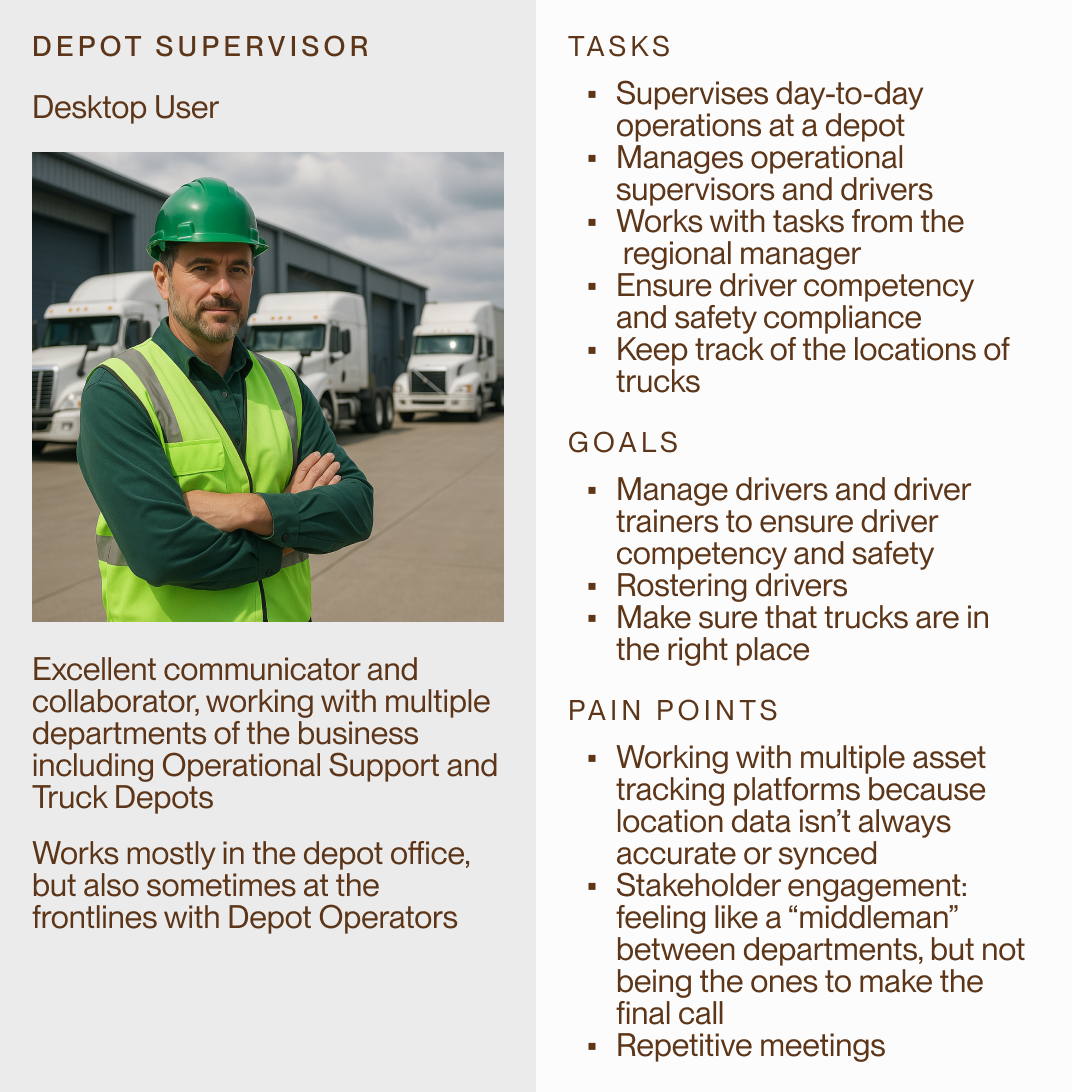
- Depot staff are often forced to act as intermediaries between systems.
- The ability to locate trucks quickly is a recurring pain point.
- Too many tracking platforms cause frustration and confusion.
- Truck Drivers don’t have access to ProtonTrucks (another vehicle tracking platform), limiting their view of all available assets.
Personas
From the user interviews above, we created some personas for Depot Supervisors and Truck Drivers (note: the images for these personas were generated using AI for anonymity):
Stakeholder Engagement
Company X management aimed to deliver a cost-effective solution targeting only the most impacted user groups.
Collaborating with the engineering team, we concluded that a native app was out of scope. Instead, a responsive, browser-based mobile app was deemed the most feasible path forward.
To minimise development effort:
- Existing desktop components were reused
- Design system guidelines were maintained
- Feature set was narrowed to mobile-relevant use cases only
Solution
The mobile redesign prioritised usability for Truck Drivers on the move. The interface was streamlined to focus on the Map View, allowing quick vehicle lookup and status checks without requiring additional apps or calls to supervisors. Some key changes include:
- Touch-friendly UI adjustments
- Simplified navigation flow for mobile
- Optimised for real-time vehicle tracking
- Minimum viable feature set to reduce dev effort
Outcome and Final Remarks
Design is never completed in a vacuum, and the process of communicating across teams is essential to delivering work that is impactful, while achieving business objectives.
The Truck Tracker mobile conversion initiative was approved by Product Management and Development teams. While it is a secondary priority to the project, the adoption of existing elements allow devs to work on mobile conversion when they have free time. Using a reductive approach decreases the cost and effort oftentimes associated with responsive adaptations.
This project taught me that converting a desktop design into a mobile application shouldn’t be a 1:1 process. It requires a completely new Discovery phase to determine who the end user may be, and the features that are necessary for implementation.
I hope you enjoyed this case study!